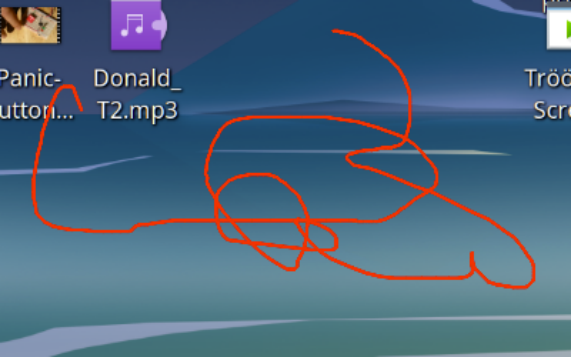
Rote Mausspuren auf dem Bildschirm. Und die gehen auch nicht mehr weg.

Das kann schon mal passieren, dass man mit der flachen Hand die vordere linke Ecke der Tastatur drückt und gleichzeitig die Maus schubst.
So  löscht man die Linien wieder …

So kriegt man die Spuren wieder weg

META + UMSCHALT + F11 ( alle )
META + UMSCHALT + F12 ( letztes )

Tastaturshortcuts kann man auch ändern

Shotcut Linux KDE für Mausspuren
 

So werden die Spuren erzeugt

Maus bewegen und diese  Tasten drücken-

META + UMSCHALT = Freihandlinie

META + STRG + UMSCHALT = Pfeil


  • Stefan Höhn : Benutzt seit ca. 2000 Linux. Ist ein dilettierenter Autodidakt, ist der Webmaster und einziger Autor von untergang.de. Mehr Info : https://stefan-höhn.de
  • Teilen auf Mastodon:     // I got the key, I got the secret… let key = 'mastodon-instance'; let instance = localStorage.getItem(key); // get the link from the DOM const button = document.querySelector('.mastodon-share'); // refresh the link with the instance name const refreshlink = (instance) => { button.href = `https://${instance}/share?text=${encodeURIComponent(document.title)}%0A${encodeURIComponent(location.href)}`; } // got it? Let's go! if (button) { // labels and texts from the link let prompt = button.dataset.prompt || 'Please tell me your Mastodon instance'; let editlabel = button.dataset.editlabel || 'Edit your Mastodon instance'; let edittext = button.dataset.edittext || '✏️'; // Ask the user for the instance name and set it… const setinstance = _ => { instance = window.prompt(prompt, instance); if(instance) { localStorage.setItem(key, instance); createeditbutton(); refreshlink(instance); button.click(); } } // create and insert the edit link const createeditbutton = _ => { if (document.querySelector('button.mastodon-edit')) return; let editlink = document.createElement('button'); editlink.innerText = edittext; editlink.classList.add('mastodon-edit'); editlink.title = editlabel; editlink.ariaLabel = editlabel; editlink.addEventListener('click', (e) => { e.preventDefault(); localStorage.removeItem(key); setinstance(); }); button.insertAdjacentElement('afterend', editlink); } // if there is a value in localstorage, create the edit link if(localStorage.getItem(key)) { createeditbutton(); } // When a user clicks the link button.addEventListener('click', (e) => { // If the user has already entered their instance // and it is in localstorage write out the link href // with the instance and the current page title and URL if(localStorage.getItem(key)) { refreshlink(localStorage.getItem(key)); // otherwise, prompt the user for their instance and save it to localstorage } else { e.preventDefault(); setinstance(); } }); }